
Privacy Statement
ISP Tracker was built to monitor Internet reliability, not your personal Internet activity.
ISP Tracker helps members understand when their Internet connection is working, when it is not working, and whether a problem appears to be limited to their own connection or affecting others nearby.
Your ISP Tracker agent is designed to monitor the health of your Internet connection. It is not designed to monitor what you do online.
We do not sell personal information. We do not build advertising profiles. We do not monitor your browsing history, emails, messages, files, passwords, or the contents of your Internet traffic.
Quick Overview
- Your agent monitors Internet reliability, not personal Internet activity.
- Your agent may occasionally check whether selected Internet services can be reached.
- These checks help determine whether a problem is affecting only you, others nearby, your Internet provider, or a wider area.
- The additional Internet usage from these checks is intentionally very small.
- Your street address, account details, billing details, phone number, and email address are not shown publicly.
- We do not sell your personal information to advertisers, marketers, or data brokers.
What Your Agent Does
The ISP Tracker agent is software or hardware installed on your network. It monitors your Internet connection and reports connection status information to ISP Tracker so your dashboard can show when your connection is working, when it has problems, and where those problems may appear to begin.
Your agent may also occasionally check whether selected Internet services can be reached. These checks help ISP Tracker compare results from different locations and Internet providers.
This helps answer questions such as:
- Is this problem only affecting your connection?
- Are others nearby experiencing the same issue?
- Is the problem related to your Internet provider?
- Is a website or Internet service unreachable from certain areas?
- Is the issue local, regional, provider-related, or more widespread?
These checks are part of how ISP Tracker removes the mystery from Internet problems. They help members understand whether an issue appears to be inside their own network, with their Internet provider, or beyond.
What Your Agent Does Not Monitor
Your agent does not monitor or report your personal Internet activity.
Your agent does not monitor:
- The websites you personally browse.
- The pages you view.
- Your searches.
- Your emails.
- Your messages.
- Your passwords.
- Your documents or files.
- Your photos or videos.
- The contents of your Internet traffic.
ISP Tracker is interested in whether Internet connections and services are working. It is not interested in what you personally do online.
What Information Is Used
To provide the service, your agent and account may use information such as:
- Your agent ID or the nickname you assigned to the agent.
- Your general location, used to help identify whether problems are local or more widespread.
- Your Internet provider.
- Your public Internet address, used to help identify your provider and connection path.
- Your local network address and router address, used to help determine whether a problem appears to begin inside your own network or beyond it.
- Whether selected Internet services could be reached.
- Connection timing and outage history needed to create reports.
This information is used to provide your dashboard, reports, alerts, outage history, and Internet reliability information.
Why Location Information Matters
Internet problems often affect only certain areas, providers, or routes. Knowing the general area where a connection problem occurred helps ISP Tracker determine whether an issue appears to affect one connection, multiple nearby connections, one provider, or a larger region.
Your street address is not displayed publicly.
Maps and reports may show a marker representing the general location of an agent involved in an outage or reliability issue. This helps make reports useful without exposing your street address or account details.
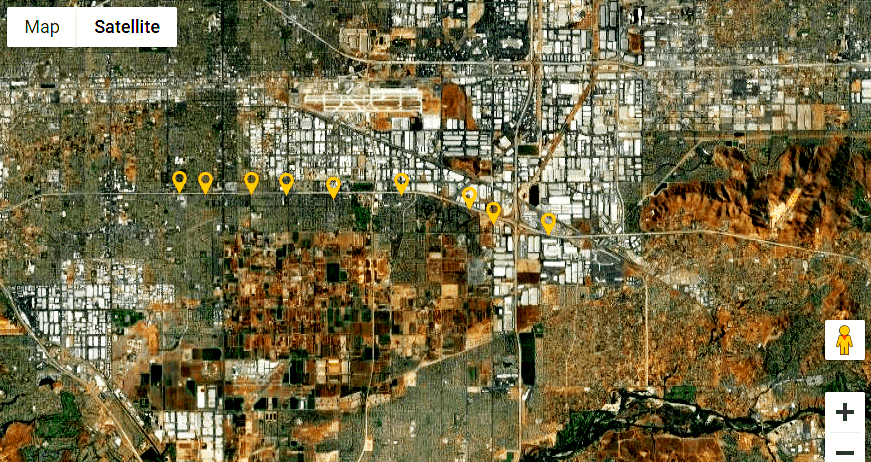
No street address or personal account information is shown in this type of public display.
How Information May Be Displayed
In some situations, ISP Tracker may display or share Internet reliability information to show that multiple locations are experiencing similar problems.
This may include:
- A map marker representing the general location of an affected agent.
- The agent ID or nickname, if you assigned one.
- The Internet provider involved.
- Connection status and outage timing.
- Information needed to show whether the issue appears local, provider-related, regional, or more widespread.
Your name, street address, billing information, phone number, and email address are not shown publicly.
If you choose an agent nickname, do not use anything personal that you would not want visible in a report.
How Your Agent Helps You and Others
When your Internet has a problem, ISP Tracker works to determine whether that issue appears to be limited to you or whether others are experiencing similar problems.
If only your agent reports a problem, the issue may be local to your connection or equipment.
If other agents nearby or on the same provider report similar problems around the same time, ISP Tracker can help identify a larger issue.
This is one of the main benefits of the service. It gives members better information when something goes wrong and helps reduce the guessing that often happens during Internet problems.
Bandwidth and System Use
The additional Internet usage from your agent is intentionally kept very small.
Most checks involve only seeing whether selected Internet services can be reached and sending back a small result. In many cases, your agent only reports changes or problems, not a full list of everything that worked.
For most users, this extra usage is insignificant compared to normal everyday Internet activity such as opening a web page, checking email, or using an app.
Third-Party Services
ISP Tracker may use third-party services that help operate the platform. These may include services for maps, email, text messaging, payments, hosting, Internet provider lookup, or general location lookup.
These services are used only as needed to provide ISP Tracker features, support, reports, alerts, and account services.
We do not sell your personal information to advertisers, marketers, or data brokers.
SMS and Text Messaging
No mobile information will be shared with third parties or affiliates for marketing or promotional purposes.
Text messaging originator opt-in data and consent will not be shared with any third parties.
View our SMS Terms of Service.
Sharing Your Reports
You may choose to share your ISP Tracker reports with others, including your Internet provider, support teams, social media pages, community groups, or anyone who may benefit from the information.
Your reports are intended to help show when problems occurred, how long they lasted, and whether they appear to be local or more widespread.
Reports do not show your street address or private account details.
Our Position on Profiling
ISP Tracker does not believe in building advertising profiles from personal activity.
Many online services depend on tracking personal behavior, combining information from different sources, and using that information for advertising or marketing.
ISP Tracker is different. Our service does not need to know what you browse, read, watch, send, or search for in order to monitor Internet reliability.
We believe a service should earn trust by doing the job it was built to do without collecting personal activity that has nothing to do with the service.
Frequently Asked Privacy Questions
Does the agent watch the websites I visit?
No. Your agent does not monitor your browsing history, the websites you personally visit, the pages you view, or what you do online.
Can the agent see my emails, passwords, files, messages, photos, or videos?
No. Your agent is not designed to access or report your personal files, emails, passwords, messages, photos, videos, or the contents of your Internet traffic.
Why does my agent sometimes perform additional checks?
Your agent may occasionally check whether selected Internet services can be reached. This helps ISP Tracker determine whether a problem is limited to your connection or affecting other people, providers, or areas as well.
Will this slow down my Internet?
For most users, no. The checks are intentionally lightweight and use very little Internet traffic.
Why does ISP Tracker need my general location?
Your general location helps ISP Tracker determine whether a problem is affecting one connection, one neighborhood, one city, one provider, or a larger region.
Will my street address be shown publicly?
No. Your street address is not shown publicly.
Why might a map show a marker near my area?
Maps may show a marker representing the general location of an affected agent when displaying outage or reliability information. This helps show where Internet problems are occurring without displaying your street address or private account details.
Does ISP Tracker sell my personal information?
No. ISP Tracker does not sell your personal information to advertisers, marketers, or data brokers.
Can I share my own reports?
Yes. You may share your reports with your Internet provider, support teams, social media pages, or others if doing so helps explain or resolve an Internet problem.
Questions
If you have questions about this Privacy Statement or how ISP Tracker works, please contact us through the contact information provided on our website.
We believe privacy should be easy to understand. If something is unclear, we would rather answer your questions than leave you guessing.