
When the Internet Stops Working… Where Do You Look?
Your Wi-Fi still says you’re connected.
Your router lights look normal.
Some websites work, others don’t.
Your video call freezes. Your smart TV keeps buffering. Your ISP says everything looks fine.
So where is the problem?
Until now, answering that question usually meant guessing.
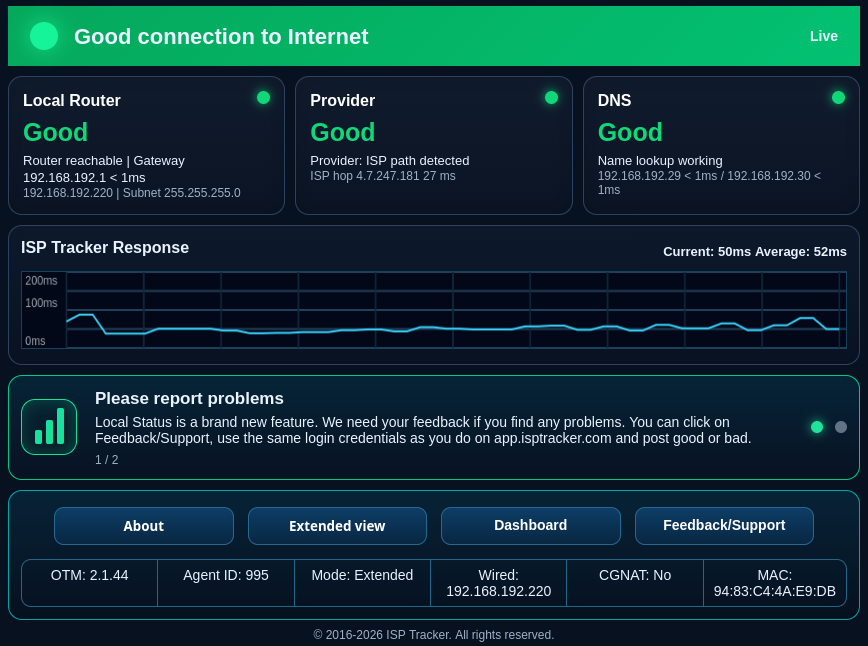
That’s why every ISP Tracker agent now includes Live Status, also called LS — a built-in local status page that lets you see what your ISP Tracker agent sees from inside your own network.
Unlike the full ISP Tracker dashboard, Live Status is designed for one thing: helping you understand what’s happening right now.
A Window Into Your Connection
Open a web browser from any device on your local network and Live Status shows the health of your connection.
Instead of wondering whether the problem is your router, your DNS servers, your internet provider, or something farther upstream, LS checks each part independently.
Within seconds you can see:
- Is your router responding?
- Is DNS working?
- Has your provider path changed?
- Is your ISP reachable?
- Can the agent still communicate with ISP Tracker?
- Have there been any recent alerts or summaries?
Rather than one generic “Internet Down” message, Live Status helps narrow the problem to the part of the connection that appears to be failing.
Built Into Every ISP Tracker Agent
One of the best things about Live Status is that there’s nothing extra to install.
It’s now included with every ISP Tracker agent, including:
- Windows
- Linux
- ARM devices
- ISP Tracker hardware agents
Simply open a browser from another computer, tablet, or phone on your local network and connect to your agent to see its current status.
No cloud login required just to check what’s happening locally.
Why DNS and Provider Path Matter
Sometimes the internet feels broken even when the connection itself is still up. A DNS failure, for example, can prevent websites from loading because your device cannot translate a website name into the address it needs to reach. Cloudflare explains DNS here.
Other problems may happen farther along the provider path, where traffic leaves your network and travels through your internet provider or upstream networks. ISP Tracker Live Status helps separate these pieces so you can better understand where the issue appears.
Local View vs. Full Dashboard
Think of Live Status as your dashboard in the moment.
The full ISP Tracker portal is where you go to review outages, reports, connection history, recurring problems, evidence, summaries, and long-term trends.
Live Status answers:
“What’s happening right now?”
The ISP Tracker dashboard answers:
“What has been happening over the last week, month, or year?”
Together they give you both immediate visibility and long-term insight into your internet reliability.
Better Information Means Better Decisions
When your connection becomes unreliable, knowing where the problem appears is often more valuable than simply knowing something is wrong.
Live Status separates your local network from DNS, provider-side, and upstream problems so you can quickly determine whether the issue appears to be inside your home or business, with your ISP, or somewhere farther away.
That means less guessing, faster troubleshooting, and better evidence when recurring problems need to be documented.
The FCC provides consumer information about broadband service and performance expectations, which can be helpful when evaluating internet reliability. See the FCC broadband consumer guide.
Available Now
Live Status is now included with every ISP Tracker agent and is available on Windows, Linux, ARM devices, and ISP Tracker hardware agents.
If you’re already running ISP Tracker, you already have Live Status.
If you’re ready to gain better visibility into your internet connection, create your ISP Tracker account today.